NetSuite Concurrency Errors: Why They Happen and How to Fix Them
Understand why multiple NetSuite integrations hit concurrency errors and learn practical ways to prevent failed requests.
By Ashoka Sanjapu
When Concurrency Becomes a Real Problem
Your integration works correctly during testing. Then production traffic increases, multiple integrations begin running together, and requests suddenly start failing.
You add retries, but the errors continue. In some cases, the retries create even more traffic and make the problem worse.
A valid NetSuite request can still fail when other integrations are already using the account's available concurrency.
The issue is usually not one bad request. It is how several integrations share and consume the available NetSuite capacity.
What NetSuite Concurrency Actually Means
Concurrency is the number of integration requests NetSuite can process at the same time.
The account-level concurrency limit is shared across:
| Request type | Uses the shared integration concurrency limit? |
|---|---|
| RESTlets | Yes |
| REST Web Services | Yes |
| SOAP Web Services | Yes |
| Map/Reduce Scripts | No, they use separate SuiteScript governance |
| Scheduled Scripts | No, they use separate SuiteScript governance |
Each active RESTlet or web-services request occupies part of the available concurrency until it finishes.
Concurrency is not the total number of requests sent during a day. It is the number of requests running at the same moment.
A Simple Example
Assume an account has five available concurrent requests.
At one moment, the following requests are running:
- Three RESTlet requests from an order integration
- One REST Web Services request from an inventory integration
- One SOAP request from another application
All five available requests are now in use.
If another request arrives before one finishes, NetSuite can reject it even though the request itself is valid.
The problem is not always the number of records being processed. It is how many requests are active at the same time and how long they remain active.
Why Concurrency Errors Happen
Concurrency problems usually come from a combination of:
- Too many parallel requests
- Multiple integrations running at the same time
- Slow RESTlets holding request slots for too long
- Immediate retries creating another traffic spike
- Sending one simultaneous API request for every record
An integration may work correctly by itself but fail when other applications begin using the same NetSuite account.
Common Concurrency Errors
The error depends on the integration method.
| Integration method | Common response |
|---|---|
| RESTlet | HTTP 400 with SSS_REQUEST_LIMIT_EXCEEDED |
| REST Web Services | HTTP 429 with CONCURRENCY_LIMIT_EXCEEDED |
| SOAP using token-based authentication | ExceededConcurrentRequestLimitFault or WS_REQUEST_BLOCKED |
| SOAP using request-level credentials | ExceededRequestLimitFault or WS_CONCUR_SESSION_DISALLWD |
Do not treat every HTTP 400 or 429 response as a concurrency problem. Check the NetSuite error code before deciding whether the request should be retried.
Diagnose the Problem Before Changing Code
Before increasing limits or changing middleware settings, confirm where the requests are coming from.
Check Integration Governance
In NetSuite, navigate to:
Setup
→ Integration
→ Integration Management
→ Integration Governance
Review:
- Account concurrency limit
- Peak concurrency
- Rejected requests
- Rejected-request ratio
- Limits assigned to individual integrations
Check the Concurrency Monitor
The APM SuiteApp Concurrency Monitor can help identify:
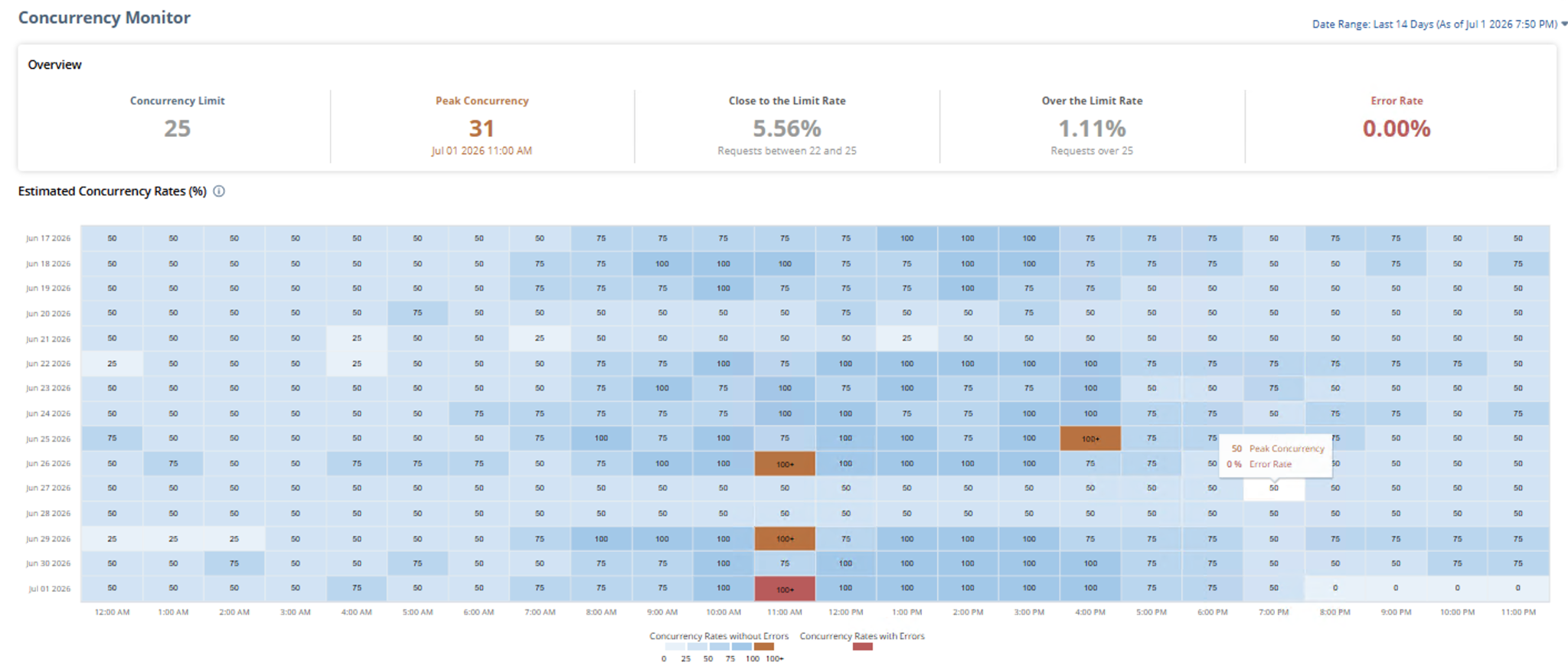
- Which integrations use the most concurrency
- When requests exceeded the limit
- Which integrations were running together
- Periods when usage approached the account limit
Match Errors With Integration Schedules
Compare the failure time with middleware schedules, order imports, inventory synchronizations, reporting jobs, and retry queues.
Failures that occur at the same time each day often point to overlapping schedules.
How to Fix NetSuite Concurrency Errors
1. Control the Request Flow
Do not send every record to NetSuite at the same time.
Use a controlled worker pool:
async function runWithConcurrency(items, limit, worker) {
  const queue = [...items];

  const workers = Array.from(
    { length: Math.min(limit, queue.length) },
    async () => {
      while (queue.length > 0) {
        const item = queue.shift();

        if (item !== undefined) {
          await worker(item);
        }
      }
    },
  );

  await Promise.all(workers);
}

await runWithConcurrency(orders, 3, sendOrderToNetSuite);
This processes a maximum of three orders at the same time.
Leave part of the account limit available for other integrations. Large scheduled integrations should also run at different times instead of competing for the same capacity.
2. Retry Safely
Retry only recognized concurrency failures. Validation, authentication, and invalid-data errors usually require correction instead.
Use exponential backoff with jitter so failed requests do not retry together:
const wait = milliseconds =>
  new Promise(resolve => setTimeout(resolve, milliseconds));

function isConcurrencyError(error) {
  const status = error?.status ?? error?.response?.status;
  const code =
    error?.code ??
    error?.response?.data?.code ??
    error?.response?.data?.["o:errorCode"];

  return (
    status === 429 ||
    code === "SSS_REQUEST_LIMIT_EXCEEDED" ||
    code === "CONCURRENCY_LIMIT_EXCEEDED" ||
    code === "WS_REQUEST_BLOCKED" ||
    code === "WS_CONCUR_SESSION_DISALLWD"
  );
}

async function executeWithRetry(operation, maxAttempts = 5) {
  for (let attempt = 1; attempt <= maxAttempts; attempt += 1) {
    try {
      return await operation();
    } catch (error) {
      if (!isConcurrencyError(error) || attempt === maxAttempts) {
        throw error;
      }

      const delay =
        1000 * 2 ** (attempt - 1) +
        Math.floor(Math.random() * 500);

      await wait(delay);
    }
  }
}
3. Reduce Pressure on NetSuite
Keep RESTlets and web-service requests focused:
- Avoid repeated searches and record loads
- Avoid updating the same record multiple times
- Return only the data the caller needs
- Move heavy processing to Map/Reduce when appropriate
- Use integration-specific limits only when one application needs control
- Increase SuiteCloud Plus capacity only after optimizing the integration
Moving work to Map/Reduce does not increase external API concurrency. It can shorten the RESTlet request by validating and queuing work instead of processing everything synchronously.
Reliable pattern: Limit active requests, retry temporary failures safely, and keep each NetSuite request short.
Quick Troubleshooting Checklist
- Confirm the account concurrency limit
- Review rejected requests in Integration Governance
- Identify integrations running at the failure time
- Review middleware worker settings
- Measure request duration
- Add controlled retries with backoff
- Stagger overlapping integration schedules
Final Thoughts
NetSuite concurrency errors are rarely fixed by adding retries alone.
The reliable solution is to control how many requests are sent at once, keep each request focused, and retry temporary failures without creating another traffic spike.
A well-designed integration leaves room for other applications and makes final failures easy to identify and reconcile.